
About the Profiles
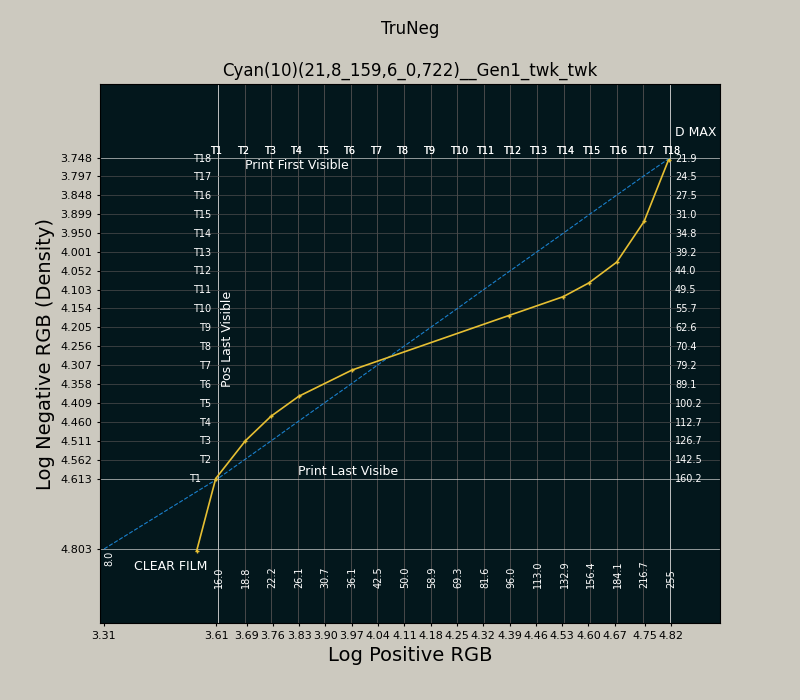
Profiles are derived from the curve that makes a satisfactory print according to John Riches. The criteria are that the print has a clean white, a good Dmax, the highlights are resolved, and shadows are separated.
To make the preset, the program measures and records the number of steps between the calculated negative represented by the blue line and the process curve at each control point. To make a preset in the Curves menu every control point must be on a vertical grid line. This means that the curve is accurately reproduced when the contrast varies with different printers, papers, and chemistries.
The printer used to make the negatives is a Canon iP8760, which printed a straight line between the RGB Logarithm and Density, apart from a small increase in density around 90 RGB. In view of the significant difference between the processes and the likely variation in the user’s printer, paper and chemistry, this was considered insignificant, and the profile can be relied upon to represent a generic form of each process.
When working with TruNeg, the monitor should be set to a gamma of 1.8; this is not based on personal preference, but because it best represents the eight-stop photographic image and how the application prints the image.
Once the first test strip is produced, working with TruNeg is similar to the traditional darkroom practice of checking the test strip, identifying any problems and making the appropriate adjustments.
Because of the variations in printers, chemistry, papers, etc, while it is possible the first test print will be satisfactory, users should expect to do two or three test strips to get the desired result.