
To get your thirty-day free trial, click on the button below.
Installation Instructions
TruNeg_5.2.2 for macOS is compatible with macOS Monterey and later versions.
TruNeg is a standalone Python app and is not installed into the system. After downloading, store the zip folder in a safe location, double-click the folder and create an alias of the TruNeg app on the desktop or in the Dock
Double-click the alias to open. The app can be slow to open, but once open, it runs normally.
Please note that you may need to install “Rosetta” for it to run on your macOS.
When the app is opened the following dialog appears.
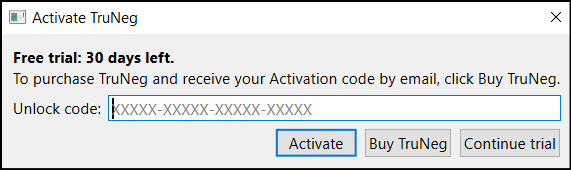
The trial starts on the date the app is first opened, and the window counts down so that you know how many days are left. After thirty days, the app does not open, but all files generated during the trial are retained.
Clicking on “Buy TruNeg” takes you to the TruNeg sales portal where you can purchase the Activation Code for US$39.00. After the purchase is confirmed, an email is sent with your code.